Getting Started
teledetection consists of two subpackages:
sdk: included in the core package, this is the Software Development Kit providing everything for most users,upload: optional, for uploading STAC collections and data, this is for data producers that want to publish their production.
This section focuses on using the SDK.
Installation
Install the SDK from the teledetection core package:
The SDK works like Microsoft Planetary Computer SDK on which it has heavily been inspired!
Note
Data producers need to install the optional subpackage upload:
Data producers are invited to take a look here to see how to generate a pystac catalog, or check in detail the pystac documentation, then read in the publish section.
Basic use
This show how HREF links of STAC assets can be signed, i.e. so that they can be
accessed, using teledetection.
As available in the STAC, HREFs are unusable as is, because they need a
security token to be accessible.
Let's consider an asset HREF that points to a remote file of the MTD geospatial data center:
href = "https://s3-data.meso.umontpellier.fr/sm1-gdc-sen2cor/sentinel2-l2a-sen2cor/S2C_20250514T072631025Z_37MCS_0511_84979446ea/T37MCS_20250514T072631_B02_10m.tif"
Here comes teledetection into action:
The first time the code in run, if the user has never authenticate with the single-sign-on (SSO), it will be prompted to do so:
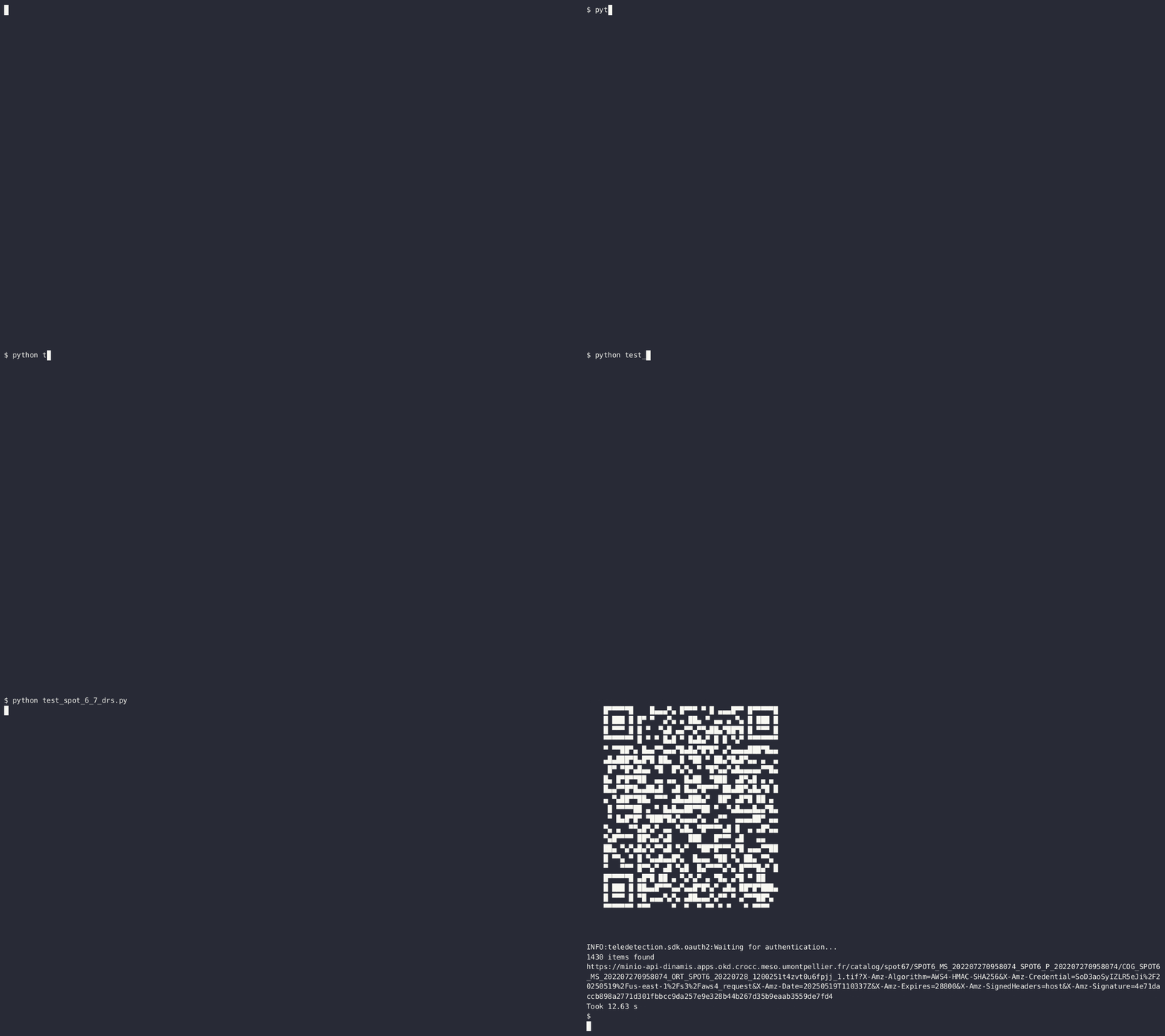
The user can either click on the link (https://auth.stac.teledetection...user_code=XXXX-YYYY) or scan the QR-code to reach the SSO login page. They can then log in using their favorite identity provider (e.g. Data-Terra via OrcID).
As soon as the user successfully authenticates, the code can continue to run and show sign(url):
https://s3-data.meso.umontpellier.fr/sm1-gdc-sen2cor/sentinel2-l2a-sen2cor/
S2C_20250514T072631025Z_37MCS_0511_84979446ea/T37MCS_20250514T072631_B02_10
m.tif?X-Amz-Algorithm=AWS4-HMAC-SHA256&X-Amz-Credential=XXXXXXXX0CS1HYBBJ5R
Z%2F20250515%2Fus-east-1%2Fs3%2Faws4_request&X-Amz-Date=20250515T182342Z&X-
Amz-Expires=28800&X-Amz-SignedHeaders=host&X-Amz-Signature=xxxxxxxcb2f27639
a0a4a6220c68exxxxxxxxxxxxxxxxx6b41995713fd472359ce
Create an API key
When authenticated with the SSO, the validity of the credentials is not very long (a few days maximum), even if, in theory, as long as they are used to interact with the APIs, they are renewed. However, if you stop using them for a few days, then you will need to log in again the next time. Sometimes this is great because it is a one-shot session (e.g. a notebook session somewhere in the cloud), but sometimes you want to have persistent credentials, for instance on your local computer. In this case, you can create an API key that will be used to interact with the services, without the need to log in again each time.
To do this, you can use the tld command line tool:
The API key is created, and stored locally on your computer.
INFO:teledetection.cli:New API key {'access-key': 'yyyyyy...xxx', 'secret-key':
'xxxyyyyy.....xxx'} created and stored in config directory
Now you can use teledetection without the need to authenticate again as
long as you don't revoke the yyyyyy...xxx key !
Further reading
We recommend to read the following:
- The authentication section presents the different methods to authenticate with the single-sign-on to grant the access to data and services,
- The Examples section details a few use-cases where STAC
objects are signed with
teledetection: pyotb, rasterio, etc.